Data Flow
This document explains how data flows through a GlassFlow pipeline and how the acknowledgment mechanism ensures reliable data processing from source to ClickHouse.
Overview
GlassFlow processes data through multiple stages, each with its own acknowledgment mechanism to ensure data reliability and prevent data loss. The pipeline uses a two-phase acknowledgment system:
- Source Acknowledgment: The source-specific mechanism (Kafka offset commits or OTLP HTTP/gRPC response codes) confirms ingestion only after successful processing.
- NATS JetStream Acknowledgment: Acknowledges messages after successful writes to downstream components.
Data Flow Architecture
A typical GlassFlow pipeline follows this flow:
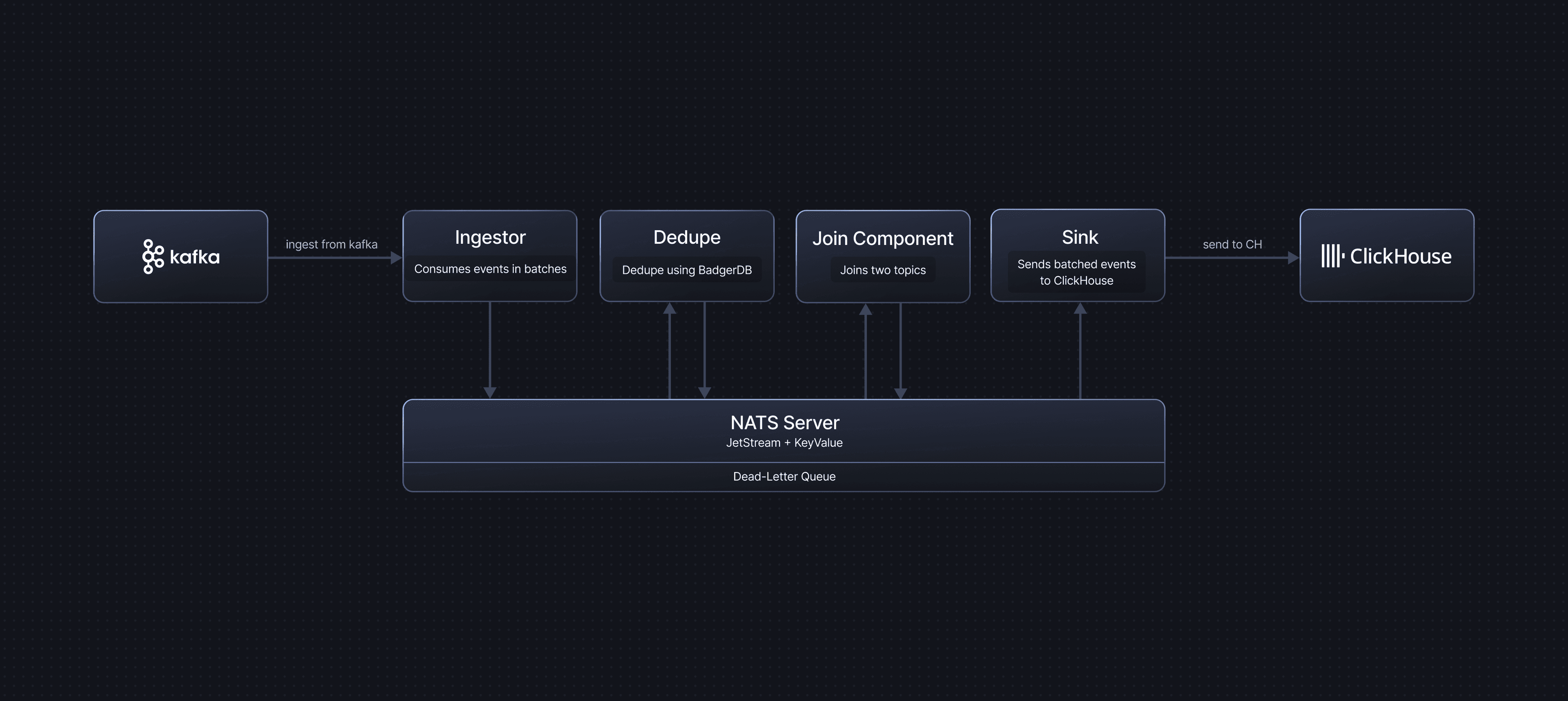
Stage 1: Source to NATS JetStream (Ingestor)
The Ingestor component consumes messages from the configured source and publishes them to NATS JetStream streams. The ingestion behaviour depends on the source type.
Kafka Source
- Kafka consumer polls for messages in batches.
- Each message is published to a NATS JetStream stream.
- Kafka offsets are committed only after all messages in the batch are successfully published to NATS.
Acknowledgment
- Kafka uses manual offset commits (auto-commit is disabled).
- Offsets are committed only after the entire batch is successfully published to NATS JetStream.
- If publishing fails, the batch is not committed, and Kafka will redeliver the messages.
Failure Handling
- If a message cannot be published to NATS, it is sent to the Dead Letter Queue (DLQ).
- The Kafka offset is still committed for that message to prevent reprocessing.
- Failed messages can be retrieved from the DLQ for manual inspection or reprocessing.
OTLP Source
- The shared OTLP Receiver accepts OpenTelemetry data over gRPC (port 4317) or HTTP (port 4318).
- The receiver flattens the OTLP protobuf payload into a JSON structure and routes it to the correct pipeline using the
x-glassflow-pipeline-idheader. - Flattened messages are published to NATS JetStream.
Acknowledgment
- The OTLP Receiver returns a success response to the sender only after messages are successfully published to NATS JetStream.
- If publishing fails, the receiver returns an error response, signalling the sender (collector or SDK) to retry.
Failure Handling
- If a message cannot be published to NATS, the receiver returns an error to the sender.
- The OpenTelemetry Collector or SDK will retry delivery based on its own retry configuration.
Stopped Pipeline Behaviour
The OTLP receiver is a shared component that does not check pipeline status. When an OTLP pipeline is stopped or terminated, the receiver continues accepting incoming data and publishing it to NATS JetStream. Streams are preserved in both cases, messages accumulate until the pipeline is resumed, subject to the stream’s max_bytes and max_age limits. Streams are only deleted when the pipeline itself is deleted. See OTLP Source, Pipeline Stop and Terminate Behaviour for details.
Stage 2: NATS JetStream Processing
NATS JetStream acts as an internal message broker between pipeline components. It provides persistent storage and reliable message delivery.
Consumer Configuration
- NATS JetStream streams use the Work Queue retention policy for pipeline consumers.
- Consumers use the Explicit acknowledgment policy – each message must be acknowledged individually after successful processing.
- Consumers have an
AckWaittimeout (default: 30 seconds) – if a message is not acknowledged within this time, NATS will redeliver it.
This setup ensures that each message is durably stored and only removed from the queue once the downstream component has finished processing it.
Stage 3: Transformations (Optional)
The Transformations stage runs in a single pod and can apply up to three operations in order: Filter, Deduplication, and Stateless Transformations. Messages flow through these processors sequentially on top of NATS JetStream.
Filter
If a filter is configured for the pipeline, filter expressions are evaluated on messages read from NATS JetStream. Events that match the filter expression pass through and continue through deduplication, stateless transformations, join, and sink. Events that do not match the filter expression are dropped and not forwarded to downstream components.
If the filter expression cannot be evaluated for a message (for example, due to a type error), that message is sent to the DLQ with the error details and then acknowledged so it is not retried endlessly. Other messages in the batch that pass the filter continue through the pipeline.
Deduplication
If deduplication is enabled, the Deduplication Service processes messages before they reach the sink.
Process
- Messages are read from the ingestor output stream.
- Duplicate detection is performed using a key-value store (BadgerDB).
- Only unique messages are forwarded to the downstream stream (or sink).
- Messages are acknowledged only after successful deduplication and forwarding.
Acknowledgment
- Messages are acknowledged only after:
- Successful deduplication check.
- Successful write to the downstream stream (sink or join).
- With the explicit acknowledgment policy, each message in the batch is acknowledged individually after it has been successfully processed.
Failure Handling
- If deduplication or forwarding fails during batch processing:
- The BadgerDB transaction is not committed – no new keys are saved to the deduplication store.
- All messages in the batch are NAKed (negatively acknowledged), causing NATS to redeliver them.
- NATS JetStream will redeliver the messages after the
AckWaittimeout expires.
- This design ensures no duplicates are produced even when processing fails:
- Since the transaction was not committed, the deduplication keys were never saved.
- When messages are redelivered and reprocessed, they will be correctly identified as duplicates (if they were already processed) or as new messages (if they were not).
- This atomic transaction approach prevents the deduplication component from producing duplicate events.
Stateless Transformations
If stateless transformations are configured, the Stateless Transformation processor reshapes each event payload using expression-based mappings before it is mapped to ClickHouse.
Process
- Messages are read from the upstream NATS stream (ingestor or previous processors in this stage).
- Each message payload is parsed as JSON and passed through a list of expressions.
- For every configured transformation:
- The expression is evaluated against the input JSON (using the
exprengine and helper functions). - The result is converted to the configured
output_typeand written underoutput_namein a new JSON object.
- The expression is evaluated against the input JSON (using the
- The transformed JSON becomes the payload used for schema mapping and ClickHouse insertion.
If no stateless transformations are configured, the original JSON payload is passed through unchanged.
Acknowledgment
- Messages are acknowledged only after all configured stateless transformations for the batch have been evaluated successfully.
- If evaluation or type conversion fails for a message in the batch:
- The failing message is sent to the DLQ with error details.
- The failing message is then acknowledged so it is not retried endlessly.
- Other messages in the batch that transform successfully continue through the pipeline.
Stage 4: Join (Optional)
If join is enabled, the Join Service combines messages from multiple streams based on join keys and time windows using a temporal join algorithm.
Process
The join service maintains separate key-value (KV) stores for the left and right streams to enable temporal matching:
Left Stream Processing
- When a message arrives from the left stream, the system looks up its join key in the right stream’s KV store.
- If a matching key is found in the right KV store, the messages are joined and sent to the output stream.
- If no match is found, the message is stored in the left KV store using its join key as the key.
- After a joined message is successfully sent to the output stream, the related left-stream message is removed from the left KV store.
Right Stream Processing
- When a message arrives from the right stream, it is automatically stored in the right KV store.
- The system then checks if a matching key exists in the left KV store.
- If a match is found, the messages are joined and sent to the output stream.
- The matched left-stream message is removed from the left KV store after successful join.
Time Window and TTL
- Both left and right KV stores have a configured time-to-live (TTL) for each key, based on the join time window.
- Entries are automatically evicted from the KV stores when their TTL expires.
- This ensures that only messages within the configured time window are considered for joining.
Acknowledgment
- Each message is individually acknowledged after it is successfully saved to the corresponding KV store.
- This ensures that messages are persisted before acknowledgment, preventing data loss.
- Messages can be evicted from the KV stores only after they have been successfully joined and sent to the output stream, or when their configured join time window (TTL) expires.
- If saving to the KV store fails, the message is NAKed, causing NATS to redeliver it.
Stage 5: ClickHouse Sink
The Sink component consumes messages from NATS JetStream and writes them to ClickHouse in batches.
Process
- Messages are consumed from the NATS stream (either from ingestor, deduplication, or join output).
- Messages are batched according to
max_batch_sizeandmax_delay_timeconfiguration. - Batches are written to ClickHouse using bulk insert operations.
- Messages are acknowledged only after successful write to ClickHouse.
Acknowledgment
- After a successful batch write to ClickHouse, each message in the batch is acknowledged individually using the explicit acknowledgment policy.
- Acknowledgment is retried up to 3 times if it fails initially.
Failure Handling
- If a batch write to ClickHouse fails:
- All messages in the failed batch are sent to the DLQ.
- Each message is individually acknowledged after being written to the DLQ.
- This prevents message loss while allowing investigation of the failure.
- Messages in the DLQ can be retrieved and reprocessed later.