Stateless Transformation
The Stateless Transformation feature lets you reshape event payloads on the fly using expression-based mappings.
It is called stateless because each event is transformed independently, without relying on any stored state or history.
Use stateless transformations when you need to:
- Normalize fields (e.g., parse URLs, user agents, or timestamps)
- Derive new fields from existing ones
- Clean up or reformat data before it lands in ClickHouse
- Map nested JSON structures into a flat schema
How It Works
Internally, stateless transformations are powered by the expr expression engine and a set of custom helper functions.
Each transformation defines:
expression: how to compute the new value, using the input JSON as contextoutput_name: the resulting field name in the transformed payloadoutput_type: the expected type of the result (e.g.,string,int,float,bool)
Internal Process
- Input Parsing: The original source event is parsed as a JSON object (
map[string]any). - Expression Evaluation:
For each configured transformation, GlassFlow evaluates theexpressionagainst the input object. - Type Conversion:
The result of the expression is converted to the configuredoutput_type(string, int, uint, float64, bool, or[]string). - Output Assembly:
All transformed fields are collected into a new JSON object keyed byoutput_name. - Downstream Processing:
The transformed JSON is then used for schema mapping and written to ClickHouse.
If no stateless transformations are configured, the input JSON is passed through unchanged.
Expression Context
Inside an expression, you can reference any field from the input JSON by its name, for example:
url,user_agent,status,age- Nested fields using dot notation, e.g.
user.id,payload.metadata.referrer
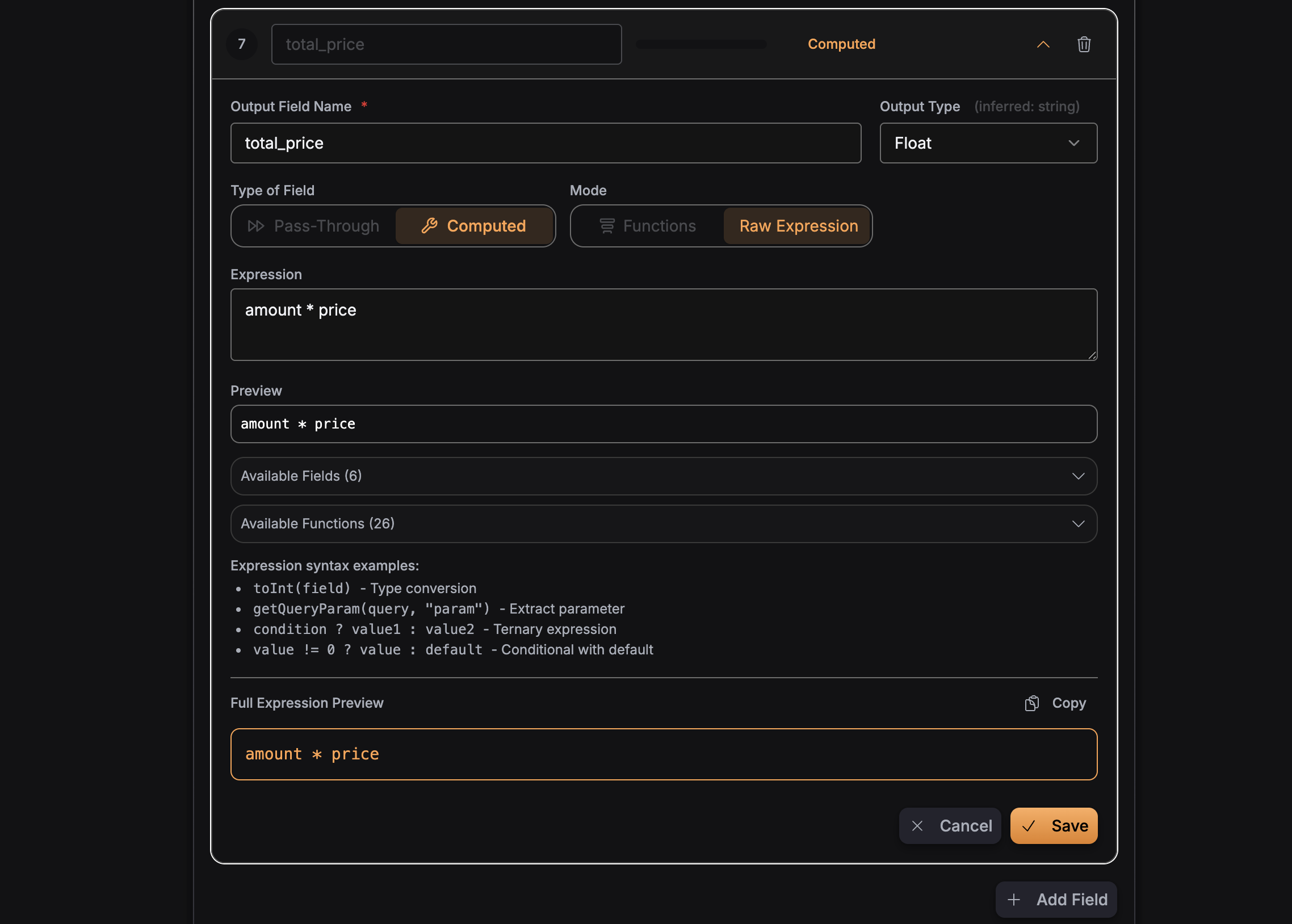
The expression engine is type-aware and supports arithmetic, string operations, conditionals, and logical operators.
Transformation Expressions
Stateless transformations are evaluated using the expr expression language. Expr is a simple, type-aware expression engine that supports literals, variables, operators, and a rich set of built-in functions. Your transformation expressions run on this engine, so you can use the full expr syntax, including arithmetic, comparison, logical and string operators, optional chaining, and predicates, in addition to the GlassFlow-specific helpers described below.
Expression Operators
The following operators are available in expressions (from the expr language definition ):
| Category | Operators | Examples |
|---|---|---|
| Arithmetic | +, -, *, /, %, ^ or ** | count * 2, 3 ** 2 |
| Comparison | ==, !=, <, >, <=, >= | status == "active", age >= 18 |
| Logical | not or !, and or &&, or or || | !disabled, a and b |
| Conditional | ?:, ??, if … else | x ? 1 : 0, name ?? "Anonymous" |
| Membership | [], ., ?., in | payload.id, tags[0], "x" in list |
| String | +, contains, startsWith, endsWith | "Hi " + name |
| Regex | matches | email matches ".*@.+\\.com" |
| Range | .. | 1..3 → [1, 2, 3] |
| Slice | [:] | arr[1:4], arr[-1] |
| Pipe | | | s | lower() | split(",") |
Functions
In addition to standard expr operators, GlassFlow provides helper functions useful for web / event data pipelines.
Use them directly in expressions, e.g. upper(status), parseUserAgent(user_agent, "device").
Each function is listed below with a short description and an example showing expression → output.
parseQuery
Parses a URL query string into a map of key/value pairs. Useful for deriving fields from ?key=value&foo=bar-style strings.
| Expression | Example output |
|---|---|
parseQuery('a=1&b=2&c=hello') | {"a": "1", "b": "2", "c": "hello"} |
parseQuery(query_string) (with query_string = "utm_source=google") | {"utm_source": "google"} |
getQueryParam
Return the value of a specific query parameter from a query string.
| Expression | Example output |
|---|---|
getQueryParam('a=1&b=2', 'b') | "2" |
getQueryParam(url_query, 'utm_campaign') (with url_query = "utm_campaign=winter") | "winter" |
getQueryParam('a=1&b=2', 'missing') | "" |
urlDecode
URL-decodes an encoded string (e.g. %20 → space, %2B → +).
| Expression | Example output |
|---|---|
urlDecode('hello%20world') | "hello world" |
urlDecode('a%3D1%26b%3D2') | "a=1&b=2" |
parseISO8601
Parses common ISO-8601 timestamp strings and returns a Unix timestamp in seconds. Supports formats such as 2006-01-02T15:04:05Z and 2006-01-02 15:04:05.000000.
| Expression | Example output |
|---|---|
parseISO8601('2024-06-15T14:30:00Z') | 1718461800 |
parseISO8601(timestamp_field) (with timestamp_field = "2024-01-01T00:00:00Z") | 1704067200 |
parseISO8601('') or invalid input | 0 |
toDate
Converts a Unix timestamp (seconds) or a time.Time value into a YYYY-MM-DD date string.
| Expression | Example output |
|---|---|
toDate(1718458200) | "2024-06-15" |
toDate(parseISO8601('2024-06-15T14:30:00Z')) | "2024-06-15" |
parseUserAgent
Extracts structured information from a user agent string. The second argument must be one of: "device", "browser", or "os".
Example user_agent value used below:
Mozilla/5.0 (Linux; Android 10; SM-G973F) AppleWebKit/537.36 (KHTML, like Gecko) Chrome/91.0.4472.120 Mobile Safari/537.36
| Expression | Example output |
|---|---|
parseUserAgent(user_agent, "device") | "Mobile" (or "Desktop" / "Tablet" for other UAs) |
parseUserAgent(user_agent, "browser") | "Chrome" |
parseUserAgent(user_agent, "os") | "Android" |
containsStr
Returns whether the first string contains the second string (substring check).
| Expression | Example output |
|---|---|
containsStr('hello world', 'world') | true |
containsStr('hello world', 'xyz') | false |
containsStr(path, '/api/') (with path = '/api/v1/users') | true |
hasPrefix
Returns whether the first string starts with the second string.
| Expression | Example output |
|---|---|
hasPrefix('hello world', 'hello') | true |
hasPrefix('hello world', 'world') | false |
hasPrefix(path, '/g/') (with path = '/g/collect') | true |
hasSuffix
Returns whether the first string ends with the second string.
| Expression | Example output |
|---|---|
hasSuffix('file.json', '.json') | true |
hasSuffix('file.json', '.txt') | false |
upper
Converts a string to uppercase.
| Expression | Example output |
|---|---|
upper('hello') | "HELLO" |
upper(status) (with status = "pending") | "PENDING" |
lower
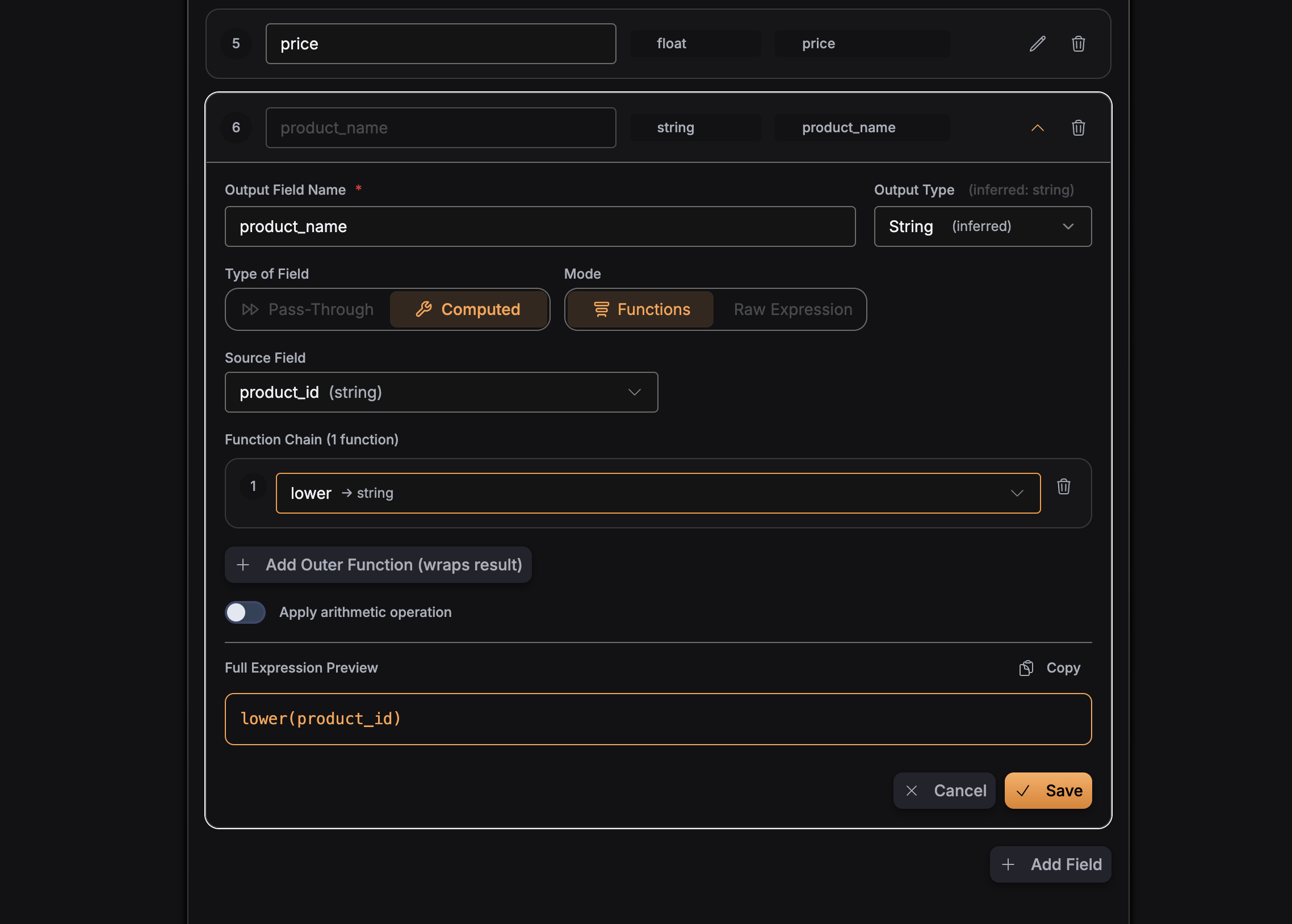
Converts a string to lowercase.
| Expression | Example output |
|---|---|
lower('HELLO') | "hello" |
lower(type) (with type = "EVENT") | "event" |
trim
Trims leading and trailing whitespace from a string.
| Expression | Example output |
|---|---|
trim(' hello ') | "hello" |
trim(raw_input) (with raw_input = "\t value \n") | "value" |
split
Splits a string by a separator and returns an array of strings.
| Expression | Example output |
|---|---|
split('a,b,c', ',') | ["a", "b", "c"] |
split('one-two-three', '-') | ["one", "two", "three"] |
split(path, '/') (with path = "/api/v1") | ["", "api", "v1"] |
join
Joins an array of values into a single string using the given separator. The first argument must be an array (e.g. the result of split).
| Expression | Example output |
|---|---|
join(['a', 'b', 'c'], '-') | "a-b-c" |
join(['x', 'y', 'z'], ' ') | "x y z" |
replace
Replaces all occurrences of a substring with another string.
| Expression | Example output |
|---|---|
replace('hello world', 'world', 'there') | "hello there" |
replace(url, 'http://', 'https://') (with url = 'http://example.com') | "https://example.com" |
toInt
Converts a value to an integer. Returns 0 for empty or invalid input.
| Expression | Example output |
|---|---|
toInt('42') | 42 |
toInt('3.14') | 0 (invalid for int) |
toInt('abc') | 0 (invalid for int) |
toInt(age_str) (with age_str = "25") | 25 |
toFloat
Converts a value to a float. Returns 0.0 for empty or invalid input.
| Expression | Example output |
|---|---|
toFloat('3.14') | 3.14 |
toFloat('42') | 42 |
toFloat(price_str) (with price_str = "19.99") | 19.99 |
floor
Returns the greatest integer value less than or equal to the argument (rounds down). Accepts a number or string that parses to a number.
| Expression | Example output |
|---|---|
floor(4.7) | 4.0 |
floor(4.2) | 4.0 |
floor(toFloat(price)) (with price = "19.99") | 19.0 |
ceil
Returns the least integer value greater than or equal to the argument (rounds up). Accepts a number or string that parses to a number.
| Expression | Example output |
|---|---|
ceil(4.2) | 5.0 |
ceil(4.0) | 4.0 |
ceil(toFloat(price)) (with price = "19.01") | 20.0 |
round
Returns the nearest integer, rounding half away from zero. Accepts a number or string that parses to a number.
| Expression | Example output |
|---|---|
round(4.5) | 5.0 |
round(4.4) | 4.0 |
round(-2.5) | -3.0 (half away from zero) |
round(toFloat(score)) (with score = "3.7") | 4.0 |
toString
Converts a value to a string. Returns "" for empty input.
| Expression | Example output |
|---|---|
toString(42) | "42" |
toString(3.14) | "3.14" |
toString(id) (with id = 12345) | "12345" |
keys
Returns all keys of a JSON object (map), sorted alphabetically.
| Expression | Example output |
|---|---|
keys(parseQuery('a=1&b=2')) | ["a", "b"] |
keys(payload) (with payload = {"x": 1, "y": 2}) | ["x", "y"] |
waterfall
Returns the first non-empty value from a list of candidates. Accepts either multiple arguments or a single array. Useful for fallbacks (e.g. prefer utm_source, then source, then "direct").
| Expression | Example output |
|---|---|
waterfall('', 'b', 'c') | "b" |
waterfall(utm_source, source, 'direct') (with utm_source = "", source = "newsletter") | "newsletter" |
waterfall('', '', 'last') | "last" |
extractPathType
Maps a known path to a request type. Recognized paths: /g/collect → "collect", /_/set_cookie → "set_cookie"; any other path → "unknown".
| Expression | Example output |
|---|---|
extractPathType('/g/collect') | "collect" |
extractPathType(path) (with path = "/_/set_cookie") | "set_cookie" |
extractPathType('/other') | "unknown" |
hasKeyPrefix
Returns whether any key in the given map starts with one of the given prefixes. First argument: map (object); second: array of prefix strings.
| Expression | Example output |
|---|---|
hasKeyPrefix(payload, ['ga_', 'gclid_']) (with payload = {"ga_session_id": "123"}) | true |
hasKeyPrefix(payload, ['utm_']) (with payload = {"page": "/"}) | false |
hasAnyKey
Returns whether the given map has at least one of the given keys. First argument: map; second: array of key names.
| Expression | Example output |
|---|---|
hasAnyKey(payload, ['user_id', 'client_id']) (with payload = {"client_id": "abc"}) | true |
hasAnyKey(payload, ['user_id', 'client_id']) (with payload = {"page": "/"}) | false |
Configuration
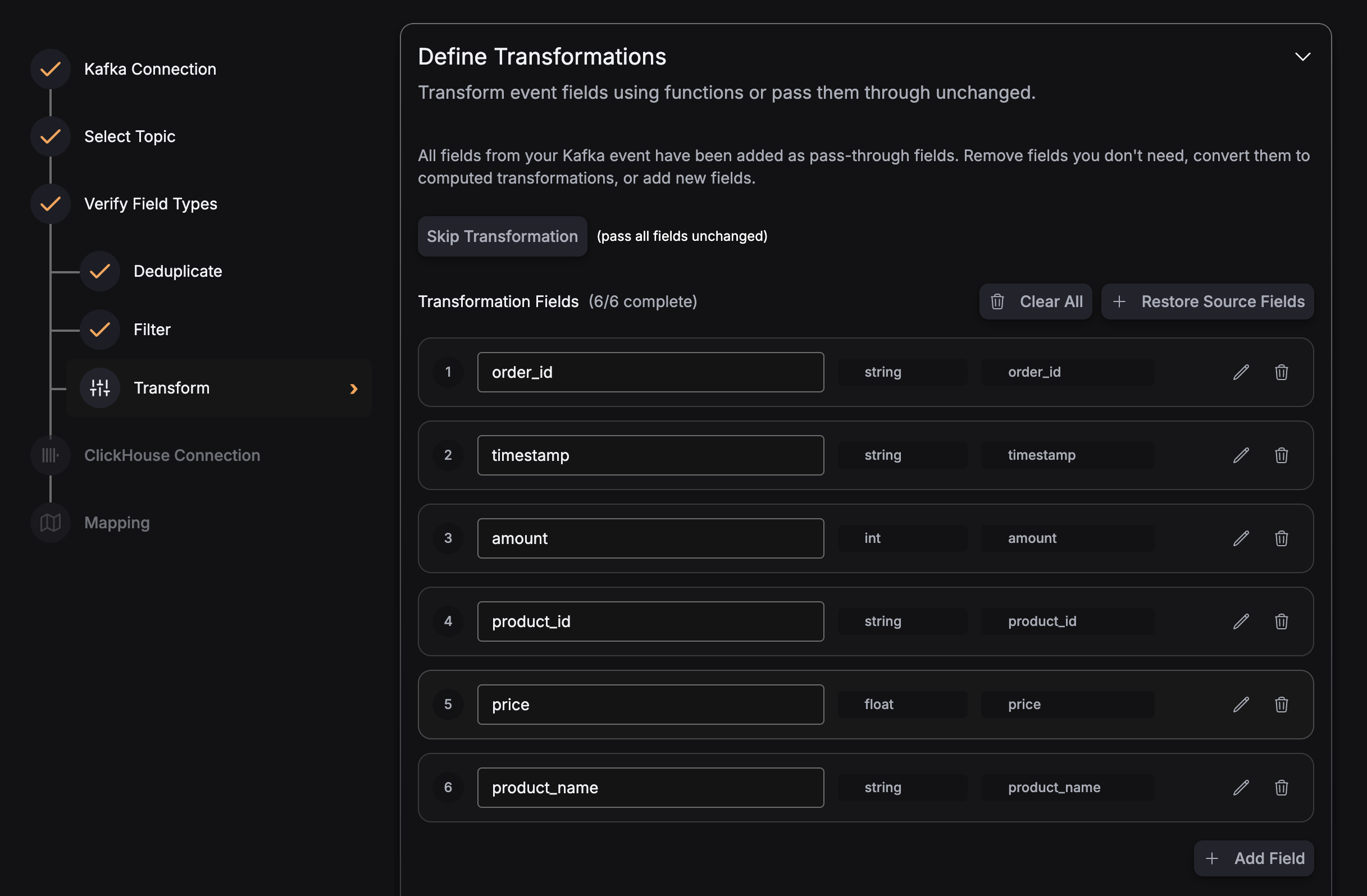
Stateless transformations are configured as part of the pipeline’s transformation section.
They are typically surfaced through the UI as derived fields or expression-based mappings.
Configuration Structure
Examples
Here’s a complete example of a pipeline with stateless transformation enabled.
Scenario: Web events with optional timestamp, path, and request_time. We derive an event date, a path-based category, and request time in microseconds.
YAML
version: v3
pipeline_id: events-with-transform
name: Web Events with Stateless Transformation
sources:
  - type: kafka
    source_id: events
    connection_params:
      brokers:
        - "kafka:9092"
      protocol: PLAINTEXT
      mechanism: NO_AUTH
    topic: events
    consumer_group_initial_offset: latest
    schema_fields:
      - name: timestamp
        type: string
      - name: path
        type: string
      - name: request_time
        type: float
transforms:
  - type: stateless
    source_id: events
    config:
      transforms:
        - expression: "toDate(parseISO8601(timestamp ?? ''))"
          output_name: event_date
          output_type: string
        - expression: "extractPathType(path ?? '') == 'collect' ? 'event' : 'other'"
          output_name: event_category
          output_type: string
        - expression: "toInt(toFloat(request_time ?? 0) * 1000000)"
          output_name: request_time_usec
          output_type: uint
sink:
  type: clickhouse
  connection_params:
    host: clickhouse.example.com
    port: "9000"
    database: default
    username: default
    password: mysecret
    secure: false
  table: web_events
  max_batch_size: 1000
  max_delay_time: 1s
  mapping:
    - name: event_date
      column_name: event_date
      column_type: Date
    - name: event_category
      column_name: event_category
      column_type: String
    - name: request_time_usec
      column_name: request_time_usec
column_type: UInt64- event_date: Custom helpers
parseISO8601andtoDateturn an ISO-8601timestampinto aYYYY-MM-DDstring;timestamp ?? ''avoids errors when the field is missing (expr nil coalescing ). - event_category:
extractPathTypeplus expr ternary : paths like/g/collectbecome"event", everything else"other". - request_time_usec:
toFloatconvertsrequest_timeto a float, then multiplies by 1,000,000 to get microseconds;toIntconverts the result to an integer.
Best Practices
- Keep expressions focused:
Prefer several small, clear transformations over one very complex expression. - Validate transformations with sample data:
Use the UI or SDK evaluation helpers (where available) to test expressions before deploying. - Align
output_typewith ClickHouse schema:
Make sure the type you choose matches the target ClickHouse column type to avoid conversion errors. - Use helpers for common patterns:
Offload parsing and normalization (timestamps, user agents, query strings) to the provided helper functions instead of re-implementing logic inside expressions.