Release Notes v2.11.0
Version 2.11.0 introduces Pipeline Resource Management, featuring new APIs to retrieve and update per-pipeline resource settings (replicas, CPU and memory). This release also adds horizontal scaling for ingestor, transform, and sink components, alongside a new Transformations Playground in the UI for testing expressions with sample data. This product release is accompanied by Helm chart v0.5.12; use the v0.5.12 chart when installing or upgrading to v2.11.x.
What’s New
📦 Pipeline Resource Management
You can now manage pipeline resources (replicas and optional CPU/memory) via the API and pipeline configuration:
- Manage Pipeline Resources via API — Use new endpoints to retrieve or modify pipeline resources for any component, including Ingestors, Transforms, Sinks, Joins, and NATS. Configure your resources during initial setup or adjust them dynamically as your needs change.
- Enhanced Resource Validation — The system now automatically validates resource updates, ensuring replica count hierarchies are maintained. We’ve also optimized default CPU and memory footprints and ensured default values are applied whenever fields are left empty.
- Pipeline JSON and reference — Pipeline resources are now fully configurable directly within your pipeline JSON. For a complete list of supported fields and syntax, refer to our updated Pipeline JSON Reference.
- Replica configuration — You can configure replicas for ingestor (base/left/right), transform, sink, and dedup as allowed by the pipeline topology. When Join is enabled, scaling is limited to the Ingestor; Join, Transform, and Sink components will run with a single replica. For pipelines with Deduplication, the Transform replica count must be set during creation and cannot be modified later.
Horizontal Scaling
Enabled horizontal scaling for ingestor, transform, and sink components to support reading and writing across multiple streams.
- Multi-stream — Sink, Ingestor and Transform components updated for reading and writing across multiple streams; subject and stream naming aligned with pipeline topology.
- Dedup component — Updated stream and subject handling for the Dedup component; the system now derives the ingestor subject from the
dedup_keywhen deduplication is enabled. Fixed the dedup-enabled flag check so dedup behavior is applied correctly.
🧪 Transformations Playground
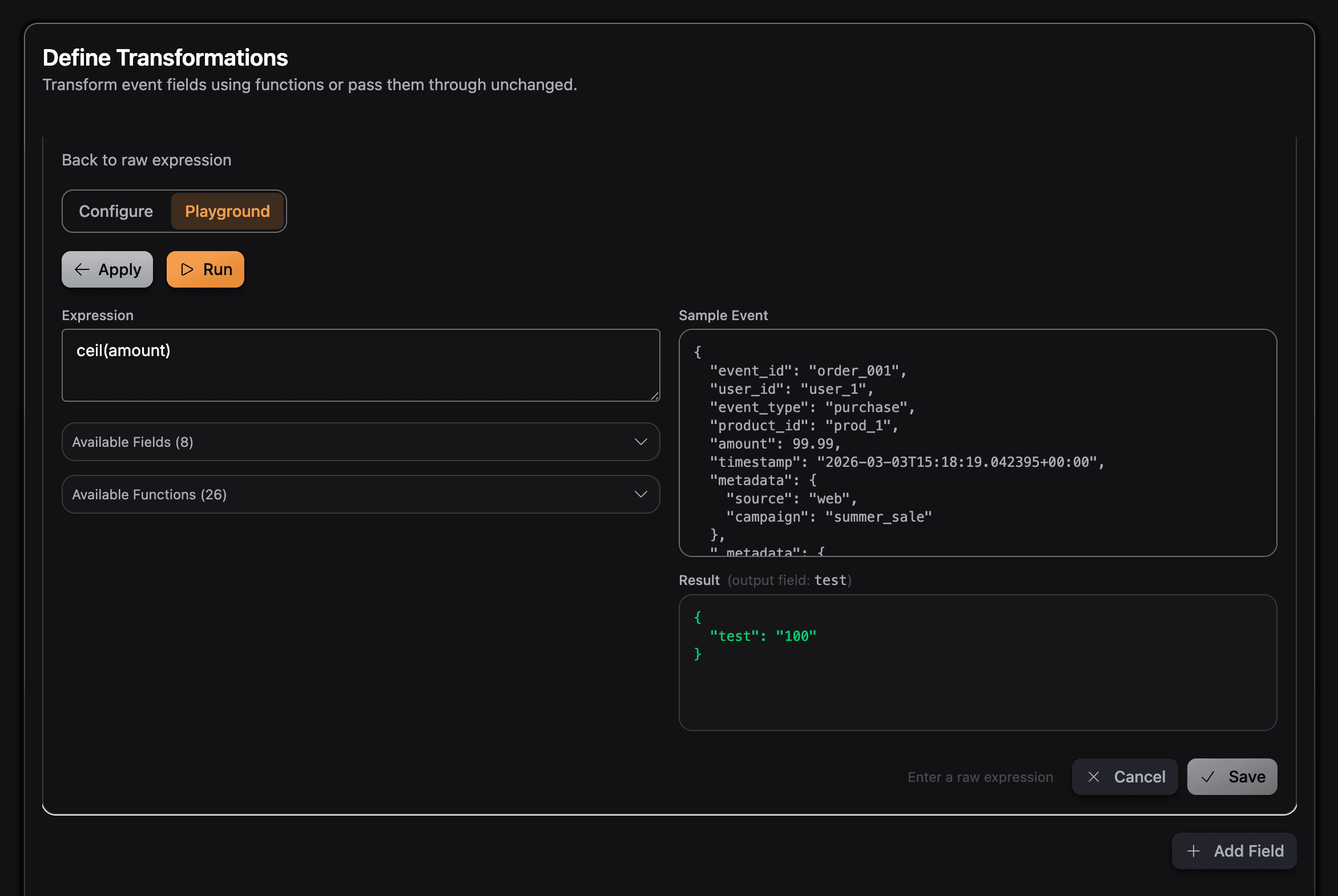
- Transformations playground — In the transformation step, you can use a playground to try expressions against sample or empty JSON. Accessible directly in Edit Mode, the playground defaults to a raw-expression view for rapid iteration.
- Labeling — Clear labeling of the field used in the playground so you can see which input is used for expression evaluation.
🔧 Transformations and Validation
- Expression validation — Removed empty data validation for transforms to prevent errors with specific expression functions; improved validation for transform expressions with empty JSON and ClickHouse-supported types.
- New helper functions —
floor,ceil, androundadded as custom expression functions for numeric rounding. - Transform
joinbug — Fixes for transformationjoinwhere it would return an empty string when concatenated with split function.
📤 Config Upload and Review
- Upload and hydration — Removed duplicated fields during hydration from uploaded configs and fixed an issue that produced incorrect configurations during the upload process.
- Review step — Aligned the review configuration with the latest pipeline config shape and ensured the pipeline ID passes correctly to the review component.
🔒 Security
- Pipeline history — Credentials are now encrypted when stored as part of pipeline history events, ensuring sensitive data remains protected within your pipeline audit trail.
🐛 Bug Fixes
- Config upload — Resolved duplicated fields on hydration and wrong config produced for the uploaded config.
- Transform validation — Adjusted empty data and expression validation to ensure the system does not reject valid expressions. Added ClickHouse type validation in the API.
- Pipeline ID — Validation and error handling for pipeline ID length and duplicate ID on create.
- Encryption secret — Fixed a bug that recreated the encryption secret rendering the credentials unreadable.
Migration Notes
You need to follow the migration guide only if your current installation has encryption enabled (global.encryption.enabled=true) and you did not set global.encryption.existingSecret (i.e. the chart is managing the encryption secret for you). In that case, you must migrate your existing credentials to the new encryption secret when upgrading to v2.11.x.
If you are doing a fresh install, or you had global.encryption.enabled=false, or you set global.encryption.existingSecret yourself, you do not need to run this migration.
👉 Migration Guide → — Step-by-step instructions for migrating from v2.10.x to v2.11.x
Backward Compatibility
- Existing pipelines will continue to run without interruption.
- Default resource values will be applied automatically where none are specified.
- New pipeline history event store credentials encrypted; existing history remains unchanged.
Try It Out
To try the new features in v2.11.0:
- Deploy the latest version using our Kubernetes Helm charts (chart v0.5.12 for product v2.11.x)
- Configure pipeline resources — Use the API or pipeline JSON to set replicas for ingestor, transform, or sink; see the Scaling Guide for best practices.
- Use the transformations playground — Edit a pipeline’s transformation step and try expressions in the playground with sample or empty JSON.
- Use floor, ceil, round — Use the new
floor,ceil, androundhelpers in transformation expressions. - Streamline your workflow — Upload a pipeline JSON.
- Read the Scaling Guide — Check Scaling Guide for what can be scaled and how to configure it.
Full Changelog
For a complete list of all changes, improvements, and bug fixes in v2.11.0, see our GitHub release v2.11.0 .
GlassFlow v2.11.0 continues our commitment to making streaming ETL more manageable, scalable, and secure for production use.